
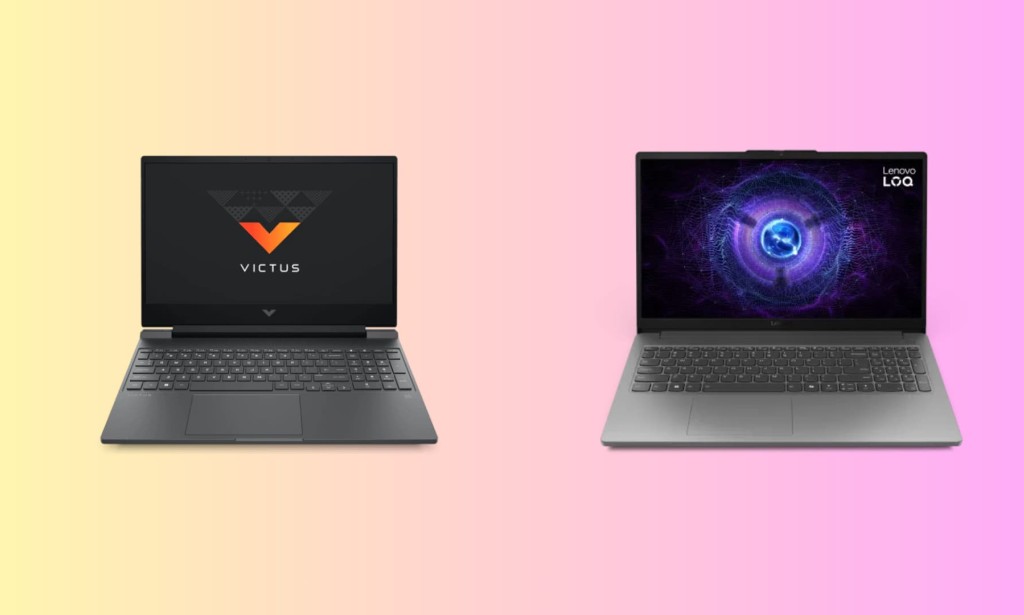
If your budget sits somewhere between $800 and $1000 and you're serious about finding the best gaming laptop that money can buy right now, two names keep coming up in almost every conversation: the HP Victus 15 and the Lenovo LOQ 15. Both target the same buyer students, budget-conscious gamers, and first-time laptop upgraders and both deliver surprisingly capable hardware at a price point that doesn't require a small loan.
But they are not the same laptop, and the differences between them matter more than the spec sheets suggest. This comparison breaks down everything from display quality to thermal management to real-world gaming performance so you can make the right call before spending your money.
Quick Overview: Who Are These Laptops For?
The HP Victus 15 has always been about accessibility. It offers a wide range of configurations, comes in at various price points, and is designed to appeal to buyers who want a recognizable brand name, a clean design, and enough gaming capability to handle popular titles without overspending.
The Lenovo LOQ 15 is a different philosophy. Lenovo built the LOQ line specifically to sit below the flagship Legion brand in price while borrowing as much performance DNA as possible. The LOQ is less about aesthetics and more about squeezing genuine gaming performance into an honest price bracket and it shows in how the hardware is configured.
Design and Build Quality
Neither of these laptops uses premium materials. That's not a criticism at this price range, plastic chassis are simply the norm but how each manufacturer uses that plastic is worth examining.
The HP Victus 15 has a clean, understated look. The matte plastic body comes in Mica Silver and Performance Blue, and while it looks sharp in photos, the finish has a known tendency to attract fingerprints and skin oils during regular use. The build is solid for its price, though the keyboard deck has some flex under pressure and the lid is thinner than ideal. HP uses a dual-fan thermal design with larger-than-expected vents for a budget chassis, which helps keep airflow reasonable.
The Lenovo LOQ 15 uses thicker plastic for both the upper and lower chassis and the lid, which gives it a noticeably more rigid feel than its price suggests. Flex in the keyboard area is minimal, and the lid holds its position well. The design is deliberately understated dark gray, clean lines, no aggressive RGB cutouts or angular vents. For buyers who want a gaming laptop they can also bring to a library or a coffee shop without drawing attention, the LOQ's subdued aesthetic works well. The hinge tension is well-balanced, allowing one-handed opening while keeping the screen stable during typing or gaming sessions.
On build quality, the LOQ 15 edges ahead the chassis feels more substantial in daily handling, and Lenovo's reputation for durable plastics holds up here.
Display: The LOQ 15 Wins This Round Clearly
Both laptops feature a 15.6-inch FHD (1920x1080) IPS display with a 144Hz refresh rate a standard setup in this price bracket that handles both competitive gaming and everyday media consumption comfortably.
However, a closer look at the panel specs reveals a meaningful difference.
The Lenovo LOQ 15 uses a panel that covers 100% of the sRGB color gamut, with a measured brightness of around 300 nits and a contrast ratio of approximately 1600:1. Colors are accurate, blacks have genuine depth for an IPS panel, and the screen holds up well in moderately lit rooms. Nvidia G-Sync support is also included on the RTX-equipped configurations, which eliminates screen tearing without requiring a separate toggle.
The HP Victus 15, by comparison, ships with a panel covering approximately 62.5% sRGB on its base configurations, though higher-end variants offer improved coverage. At 300 nits, the brightness is comparable, but the narrower color reproduction makes a visible difference when gaming in titles with rich environments or when watching content outside pure gameplay.
For a gaming laptop comparison in 2026, color accuracy matters and the LOQ 15's 100% sRGB display is a clear advantage over the Victus 15's base panel.
Specs and Configuration: What You Actually Get for $800–$1000
This is where things get interesting, because both laptops offer multiple configurations and the hardware you get for a given price varies considerably between them.
HP Victus 15 Mid-Range Configuration (~$799–$999)
- AMD Ryzen 7 7445HS or Intel Core i7-13620H
- NVIDIA GeForce RTX 4050 6GB GDDR6
- 16GB DDR5 RAM (dual-channel in most configurations)
- 512GB–1TB PCIe NVMe SSD
- 15.6-inch FHD IPS, 144Hz
Lenovo LOQ 15 Main Configuration (~$799–$999)
- AMD Ryzen 7 250 (8-core, up to 5.1 GHz) or Intel i7-13620H
- NVIDIA GeForce RTX 5060 8GB GDDR7
- 16GB DDR5-5600 RAM (single-channel one slot used)
- 512GB PCIe Gen4 SSD
- 15.6-inch FHD IPS, 144Hz, 100% sRGB
The LOQ 15's GPU advantage is significant. Getting an RTX 5060 with 8GB of GDDR7 memory in the $800–$999 range is genuinely hard to match at this price point. The HP Victus 15 typically ships with an RTX 4050 (6GB GDDR6) at comparable prices, which is a generational step behind in both raw performance and memory bandwidth.
However, the LOQ 15 ships with RAM in a single-channel configuration one 16GB stick in a single SODIMM slot. This is a notable trade-off. Single-channel memory reduces memory bandwidth, which in turn affects GPU performance since the RTX 5060 can't feed data as fast as it could in dual-channel mode. Adding a second 16GB stick later fixes this, but it's an extra cost and step that buyers should plan for.
The HP Victus 15 in its standard configurations typically uses dual-channel RAM, which means the RTX 4050 is being fed data more efficiently from the start.
Gaming Performance: RTX 5060 vs RTX 4050
Raw gaming performance goes to the Lenovo LOQ 15 when configured with the RTX 5060, and it's not particularly close.
The RTX 5060 on Nvidia's Blackwell architecture brings substantially higher CUDA core counts, GDDR7 memory, and DLSS 4 support compared to the RTX 4050's Ada Lovelace-based GDDR6 setup. In real-world 1080p gaming at high to ultra settings, the RTX 5060 delivers frame rates that the RTX 4050 simply can't match in demanding modern titles.
HP Victus 15 (RTX 4050) Typical 1080p Performance:
- Cyberpunk 2077 (High): ~45 -55 FPS
- Call of Duty Warzone (Medium-High): ~85–100 FPS
- Fortnite (Competitive settings): 140+ FPS
- Elden Ring (High): ~55–65 FPS
Lenovo LOQ 15 (RTX 5060) Typical 1080p Performance:
- Cyberpunk 2077 (High): ~70–80 FPS
- Call of Duty Warzone (High): ~120–140 FPS
- Fortnite (Competitive settings): 144+ FPS (display cap)
- Elden Ring (High): ~80–90 FPS
The LOQ 15 with an RTX 5060 also makes 1440p gaming on an external monitor a realistic proposition something the RTX 4050 in the Victus 15 struggles to do consistently on demanding titles.
DLSS 4 support on the RTX 5060 is also worth mentioning. Nvidia's latest AI upscaling technology brings a generational improvement over DLSS 3, and in supported titles it can add a significant boost to effective frame rates at minimal visual quality cost.
Thermals: A Critical Difference for Long Sessions
Gaming laptop thermals are where many buyers get surprised after purchase. Both laptops use dual-fan cooling systems, but they behave differently under sustained load.
The Lenovo LOQ 15 (Gen 10) shows genuinely controlled thermals in testing. Under sustained gaming loads, CPU core temperatures average around 77°C comfortably below the threshold where throttling becomes a concern. Memory temperatures sit around 74°C. Fan noise is present but manageable, and performance remains consistent across extended gaming sessions without significant thermal throttling.
The HP Victus 15 thermal behavior is more dependent on the configuration. With the RTX 4050 and the Intel or AMD mid-range CPUs, temperatures during gaming sessions remain reasonable. However, HP's thermal design in the Victus is less sophisticated than what Lenovo offers in the LOQ the chassis is thinner and the vents less strategically positioned, which means heat builds up faster during longer sessions. Under sustained stress, the Victus shows more performance variance than the LOQ.
For buyers planning extended gaming sessions of two hours or more, the LOQ 15's thermal management is more reliable and consistent.
Battery Life and Portability
Neither laptop wins awards for battery life gaming laptops in this segment prioritize performance over endurance.
The HP Victus 15 battery lasts up to approximately 10 hours for video playback under very light use, though real-world productivity use drops this significantly, and gaming will drain the battery in 2 to 3 hours on most configurations.
The Lenovo LOQ 15 carries a 60Wh battery relatively modest cell that delivers 2 to 3 hours of gaming and around 5 to 6 hours of office productivity use. Neither laptop is intended for all-day unplugged use.
On portability, the HP Victus 15 is slightly lighter and thinner, making it marginally easier to carry in a backpack for students moving between classes. The LOQ 15 at 2.4 kg is not heavy by gaming laptop standards, but it is a brick compared to an ultrabook, and its thicker chassis is noticeable in a bag.
If you're a student who needs to carry this laptop daily, the Victus 15 is the more comfortable option for transit.
Ports and Connectivity
HP Victus 15 ports:
- 1x USB-C (DisplayPort, HP Sleep and Charge)
- 2x USB-A (one with HP Sleep and Charge)
- 1x HDMI
- 1x RJ-45 ethernet
- 1x headphone/microphone combo jack
- Wi-Fi 6, Bluetooth 5.3
Lenovo LOQ 15 ports:
- 1x USB-C
- Multiple USB-A 3.2
- 1x HDMI 2.1
- 1x RJ-45 ethernet
- Wi-Fi 6E, Bluetooth 5.2
The LOQ 15's Wi-Fi 6E gives it a slight connectivity advantage for buyers with a 6GHz-capable router, offering faster wireless speeds and less interference than the Victus 15's Wi-Fi 6. Both laptops include wired ethernet essential for competitive gaming at home.
Value for Money: Which Is the Smarter Purchase?
| HP Victus 15 | Lenovo LOQ 15 | |
| Starting Price | ~$599 | ~$799 |
| GPU (mid config) | RTX 4050 6GB | RTX 5060 8GB GDDR7 |
| Display sRGB | ~62.5% (base) | 100% sRGB |
| Thermals | Adequate | Excellent |
| RAM Config | Dual-channel | Single-channel (upgradeable) |
| Build Quality | Solid plastic | Thicker, more rigid plastic |
| Portability | Lighter, easier to carry | Heavier, more desk-focused |
| Battery | ~10hr video / ~3hr gaming | ~6hr office / ~2.5hr gaming |
| Best For | Budget-first buyers, portability | Performance-first buyers |
Who Should Buy the HP Victus 15?
The HP Victus 15 makes the most sense for students and buyers who prioritize portability and brand flexibility. If you're picking up the laptop primarily for college use with occasional gaming, and you want to keep costs under $750, the Victus 15 with an RTX 4050 handles popular esports titles and everyday college workloads without issue. It's also the better choice if you need to carry the laptop in a bag for long stretches every day.
Who Should Buy the Lenovo LOQ 15?
The Lenovo LOQ 15 is the right choice if gaming performance is your priority and you're willing to spend $800–$999. The RTX 5060 configuration represents exceptional value at this price range and is genuinely difficult to match anywhere in the budget gaming market right now. The 100% sRGB display, superior thermals, and DLSS 4 support make it the more forward-looking purchase. The single-channel RAM is the only real weakness and it's fixable with a second memory stick for around $30–$40 after purchase.
For pure gaming capability at the $800–$1000 price point, the Lenovo LOQ 15 wins this comparison but the HP Victus 15 remains a legitimate choice for buyers who value portability and a lower entry price over raw gaming power.

You must be logged in to post a comment.